
Many of the top devtools are using GitHub SEO to get attention and drive product adoption. You can do the same for your developer product.
This guide is a roadmap to achieve that while following best practices and avoiding common mistakes. And first, let's see the kind of results that Search Engine Optimization for GitHub repositories can deliver.
What is GitHub SEO?
GitHub SEO is the practice of optimizing your repository or creating new ones to improve your product discoverability and visibility.
While many developers see GitHub as just a platform to host code, some marketers use Search Engine Optimization as an acquisition channel that works by ranking on Google for specific search terms, such as "llm observability python".
However, you can use repos both to help developers and optimize them to be featured when people search. That way, your product will be visible and recommended when people search on GitHub.
But did you know that Google is the top referrer to GitHub and therefore the most common entry point for our users? Here's an example that drives traffic and generates customers:
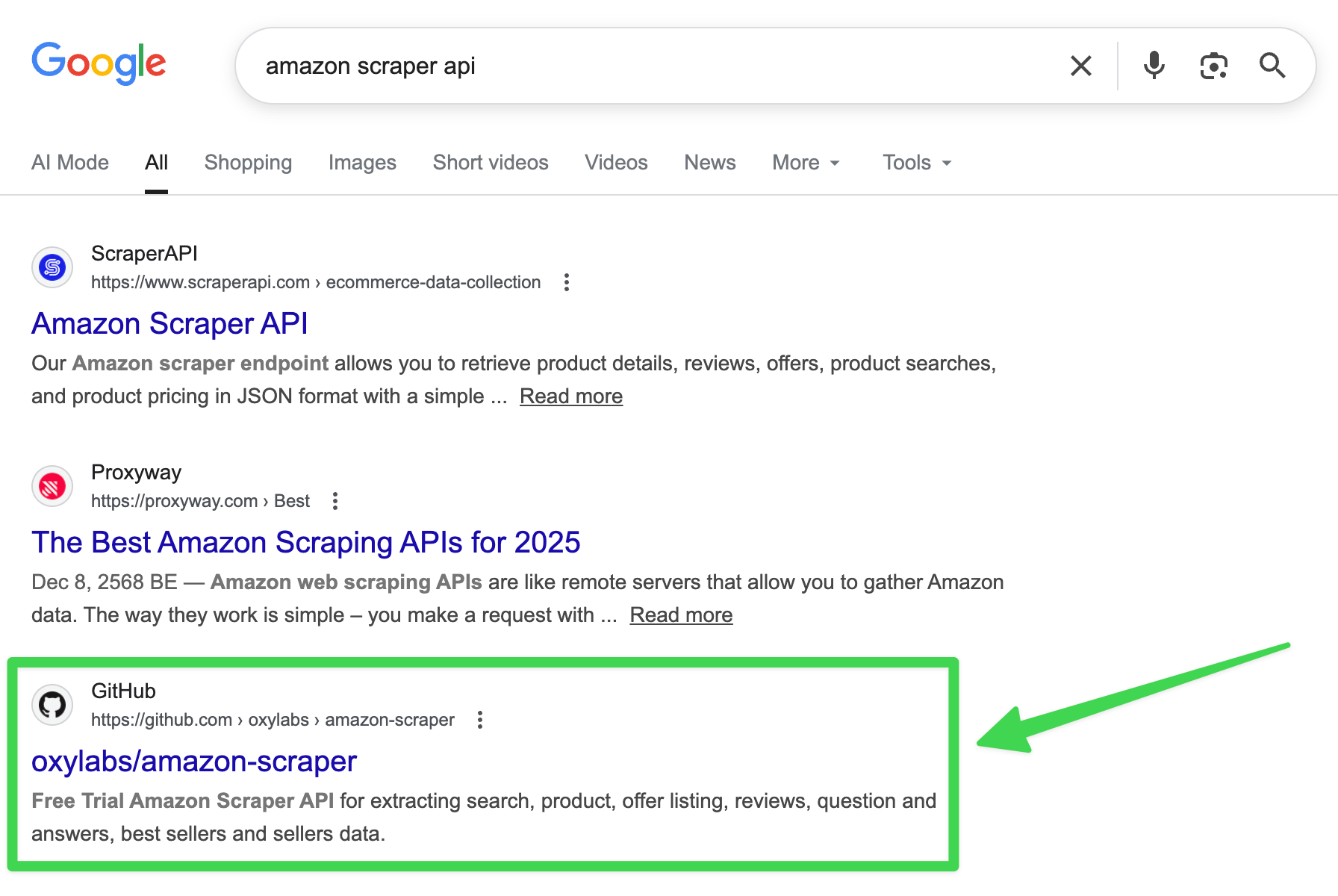
Even more, as online search drifts to AI tools, research proves that many LLMs, like ChatGPT, rely on Google results pages. So if you rank in traditional SEO, you'll also rank for AI SEO (or GEO).
Here's an example with Perplexity:
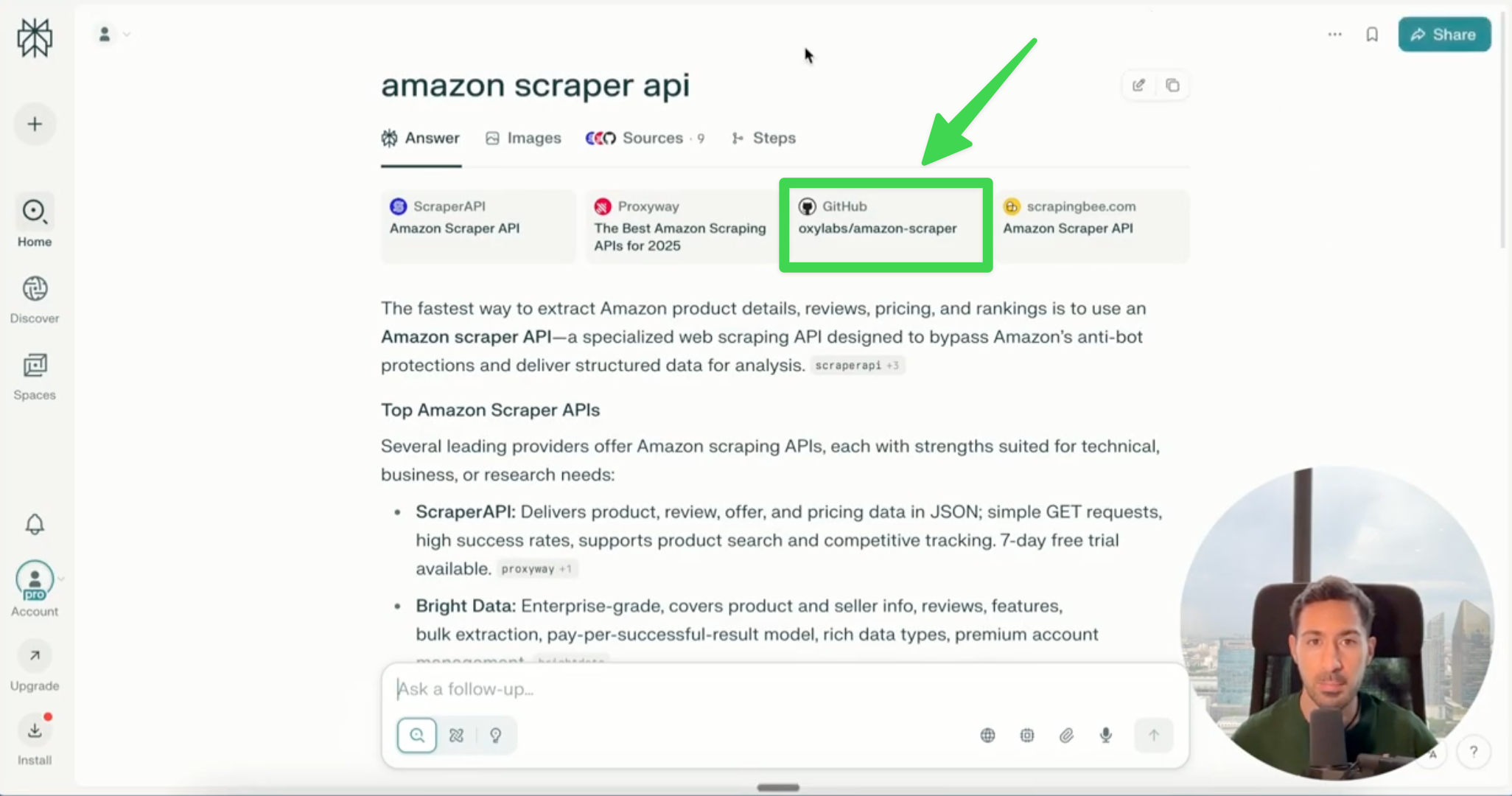
Overall, that means that if you implement GitHub SEO properly, your developer product will rank for searches inside GitHub, queries on Google and other search engines, and you'll be featured in AI answers (with brand mentions and citations).
Exciting? So let's see how you can do it.
GitHub search ranking factors
It's not public how exactly GitHub's search ranking works, but after spending 70+ hours reverse-engineering its algorithm and finding patterns, here's an introductory actionable overview of the most important factors.
Let's imagine you created a CI/CD pipeline tool and wanted to get visibility for it. For educational purposes only (oversimplification), assume you want to be featured whenever someone looks for "ci/cd".
This is what nobody will tell you: there's not only one algorithm, but multiple ones, depending on the "environment", which are topic pages and search results pages.
Want to see an example?
The CI/CD topic page is almost exclusively focused on stars:
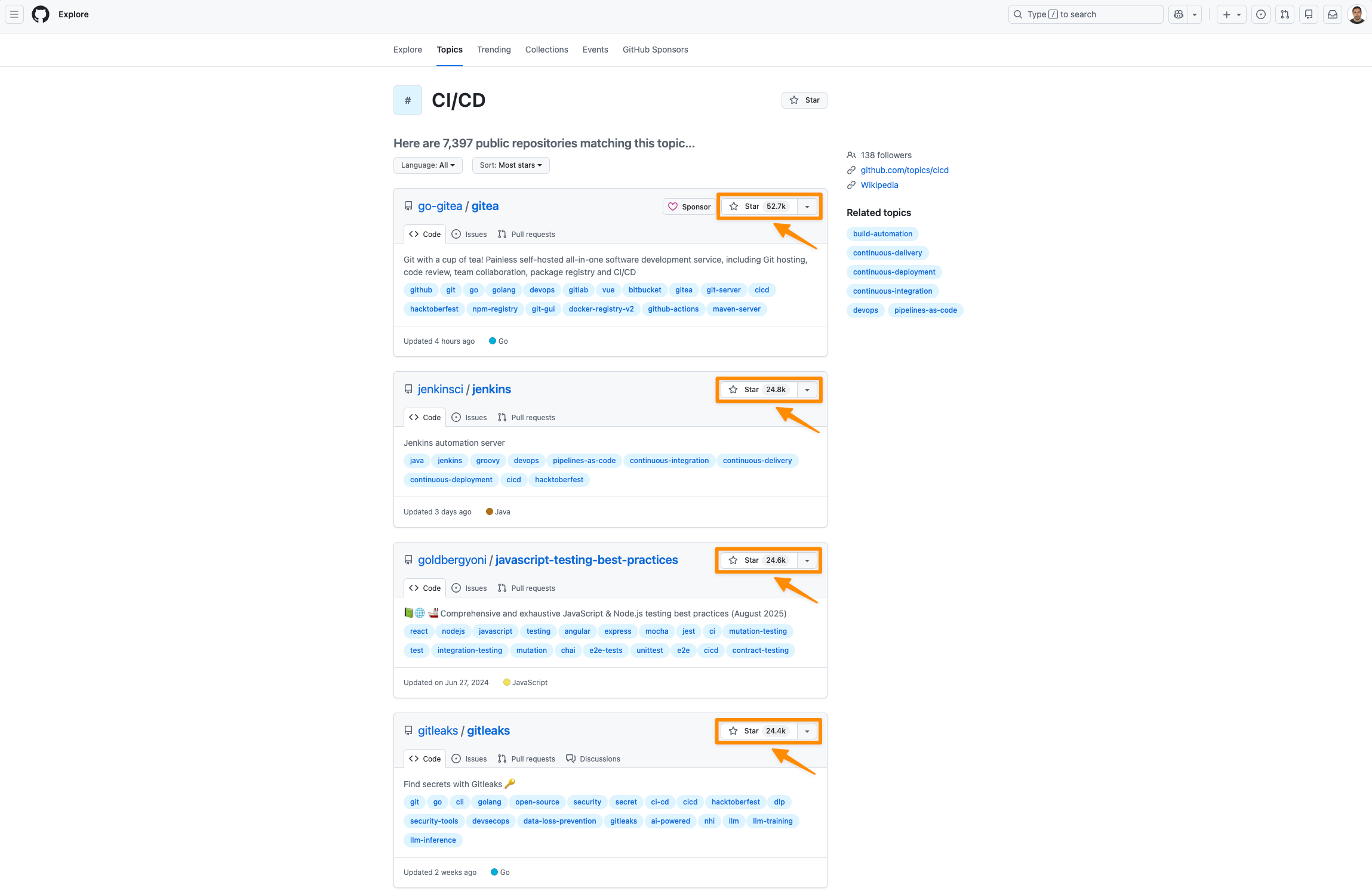
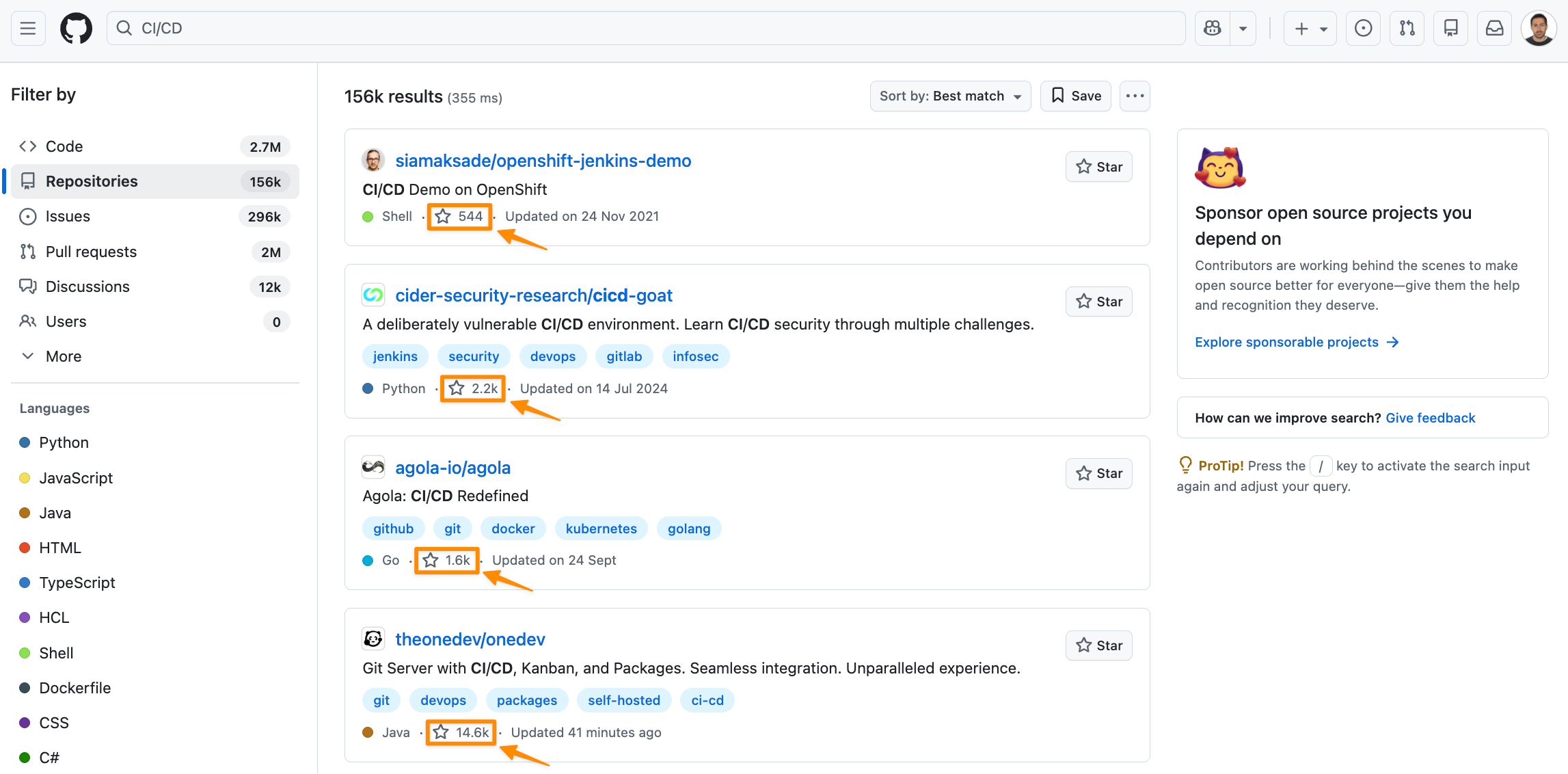
Meanwhile, the CI/CD search results page shows a much higher variety, where the first repository has only 544 but it outranks other ones that have 2.5k and even 14.06k stars.
The good news is that topic pages are by far the most important environment to dominate if you want to rank where 99% of the searches happen: on Google and ChatGPT. And what is most valued is getting more stars and doing better SEO on GitHub.
That's also confirmed by empiric evidence, with a study that confirms that stars have a high correlation with actual popularity (coefficient of 0.925).
But alright, winning over competing repos requires more nuances and activities, so here are some of the most important ranking factors overall:
| Dimension | Signals |
|---|---|
| Search proximity |
|
| Popularity |
|
| Engagement |
|
| Messaging |
|
Let's move on to the actionable steps.
How to optimize your repo for GitHub SEO and search engines
Ranking on GitHub isn't about hacks or luck. It requires a strategy, and we'll show you real examples.
Let's learn how to optimize your repo so that search engines recommend it.
Choose a winning repository name
There are two types of names for repos:
- Branded: you don't know what they are about, even though you might get some hints, e.g. botasaurus (you just know it might be something to do with bots).
- Descriptive: the name already tells you what it is about, e.g. ScreenRecorder.
The self-descriptive ai-chatbot-framework did a great job because it ranks #1 for "chatbot framework", and #2 for "ai chatbot framework", very profitable keywords nowadays.
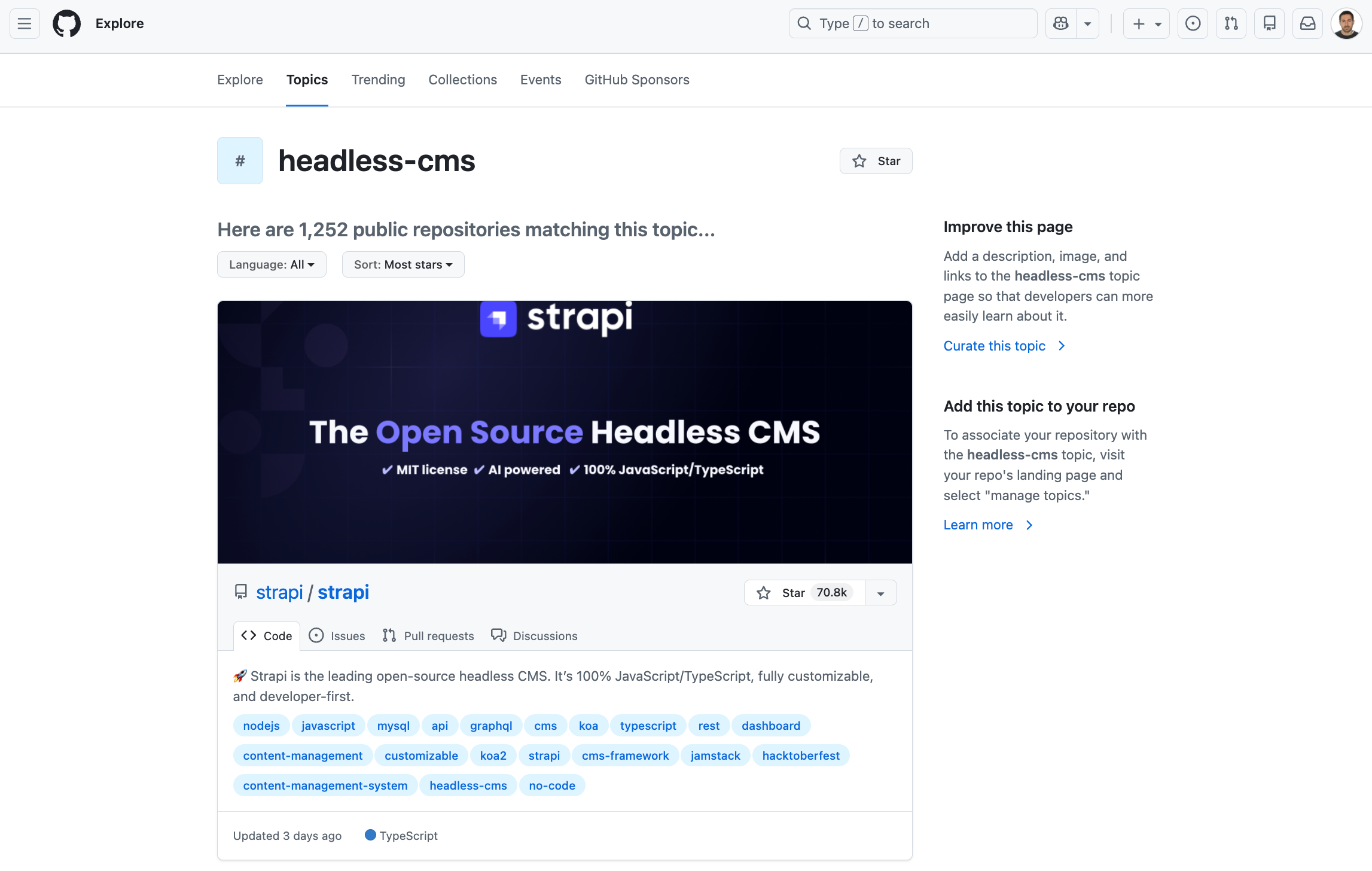
Yet, branded projects can also gather SEO impact with a combination of approaches. For example, many developers append "github" at the end of their searches to google what they want to find on GitHub. Such a case is: "headless cms" → "headless cms github". And a topic page appears, where strapi wins.
Both naming approaches have pros and cons. For search engine optimization, self-descriptive naming tends to be more helpful because it can easily be or contain a keyword.
Find and use a target keyword
You already know what your repository is about. The next step is to brainstorm what developers would type on GitHub or Google to find a tool like yours. For instance, "python testing".
Then, check out whether some people are actually searching for it. A starting point can be using a free tool like Ahrefs' Keyword Generator, which gives you the monthly search volume of a keyword.
Once you have found and selected a target keyword, it's very important to use it in key placements, like the repository's name, the About description, and the README.md.
Also, we highly recommend using keyword variations to sound more natural and prevent keyword stuffing. For example: Python testing, Python tests, do testing with Python, etc. And you can also come up with synonyms and related terms.
Indeed, a paper proved that ranking for multiple terms is feasible.
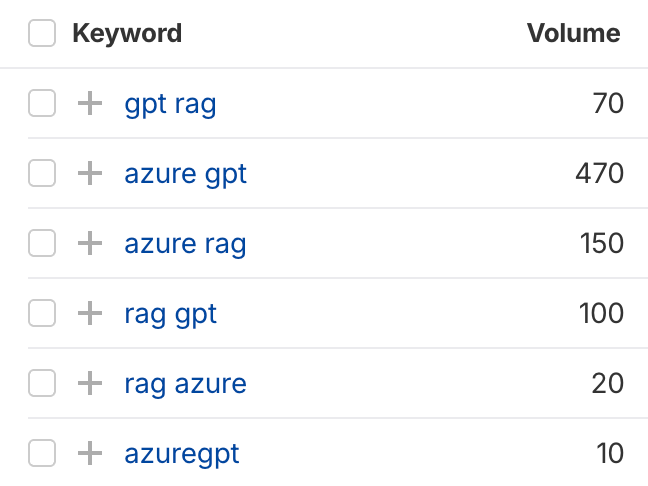
An interesting case is Azure's GPT-RAG, a collection of templates that ranks for "rag gpt", as well as branded keywords like "azure gtp", which are searched 820 times per month on Google alone.
Add an engaging about section
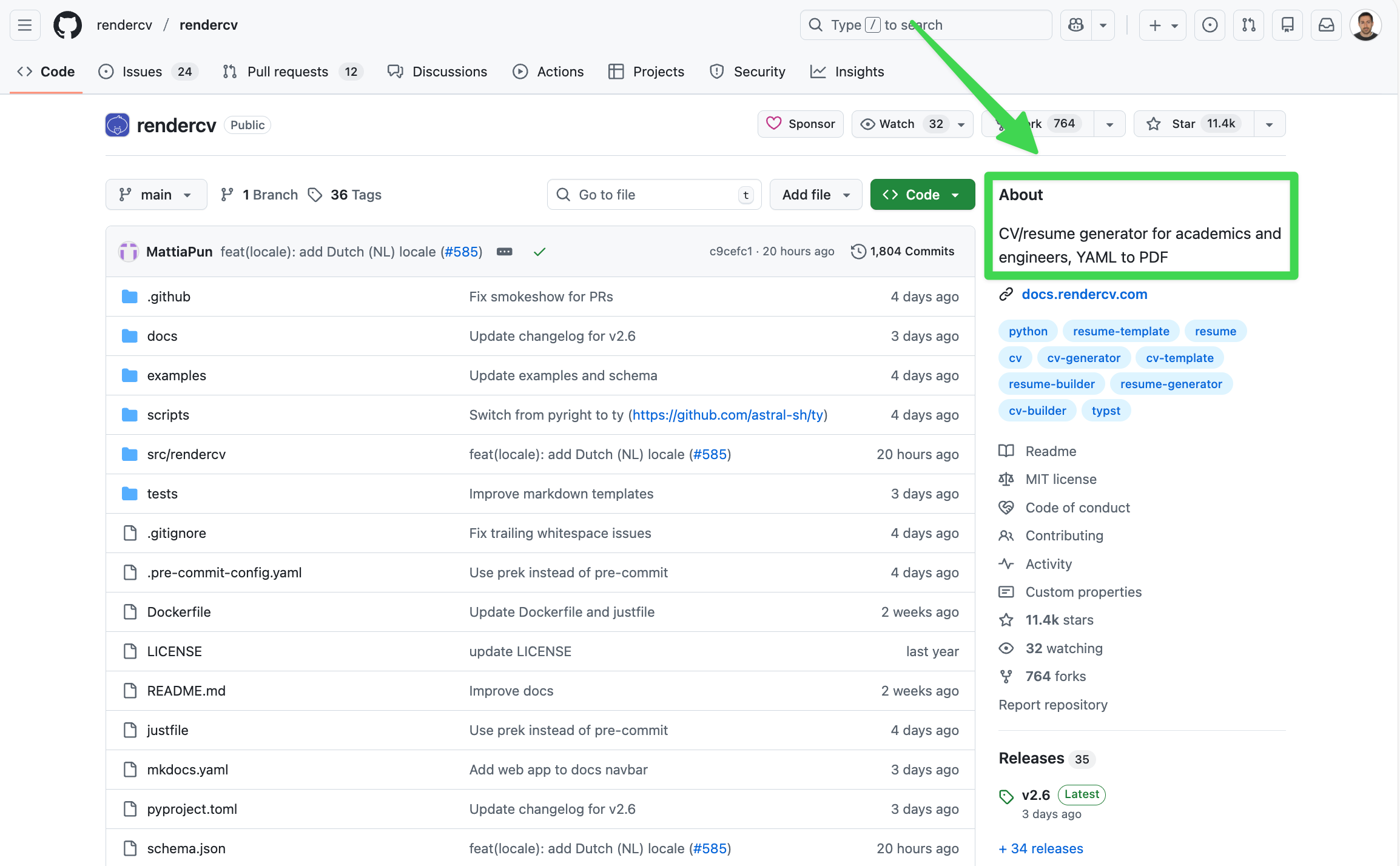
The About section is a small text that appears on the right sidebar in your repository. It's also the text that is featured in GitHub topic pages that recommend projects.
A great About section clearly communicates what your repo is about. For that, it mostly replies to one or some of these questions:
- What is it?
- Who is it for?
- When do you need it?
- How is it different?
- What does it integrate with?
- How does it work?
Here's a good example from rendercv, which states what it is, for whom, and the main mechanism. Also, it targets the keyword "resume generator":
CV/resume generator for academics and engineers, YAML to PDF.
Here's another well-written example, from tailwindcss, which communicates what it is and the advantage:
A utility-first CSS framework for rapid UI development.
And a last one, where pydantic communicates what it does and what it brings to the table:
Data validation using Python type hints.
Aim for a short and clear text. You can use the following guideline as a rule of thumb:
- Less than 120 characters: ideal
- 120–250 characters: can be acceptable sometimes
- Over 250 characters: too long
Write a compelling README
Visitors will land in your GitHub repository because something gets their attention, and it helps that your README contains keywords and some content to be taken seriously by search engines.
Now, it should create interest and convert visitors into users.
So what's a guideline to accomplish both the ranking and the traffic conversion goals?
BE HELPFUL.
Some important questions your README should answer are:
- What's the overview of what this project does?
- Is it for me?
- What technologies does it use?
- How do I get my first success?
Make sure to add some screenshots or GIFs of what you get as a result, copy-paste code snippets to try, and social media links to ask questions.
Think of a GitHub repository as a landing page. And if you need some help with that, we wrote an article on writing landing pages for developers.
Overall, your project can be a tool or technical documentation. The first one is real software. Meanwhile, the second one is a sort of tutorial where you give a step by step on how to accomplish a task, and then introduce your paid solution, like in the case of Oxylabs' google-maps-scraper.
Pick the most suitable topic tags to boost GitHub SEO
In my experience, topic tags are the most underoptimized yet top resource to rank on GitHub, Google and LLMs.
One of my favorite examples is amazon-scraper, which ranks for keywords like "amazon scraper", "amazon scraper api" and "ecommerce scraper", and has got 2.5k stars. And they did so by stacking topic tags with on-page SEO.
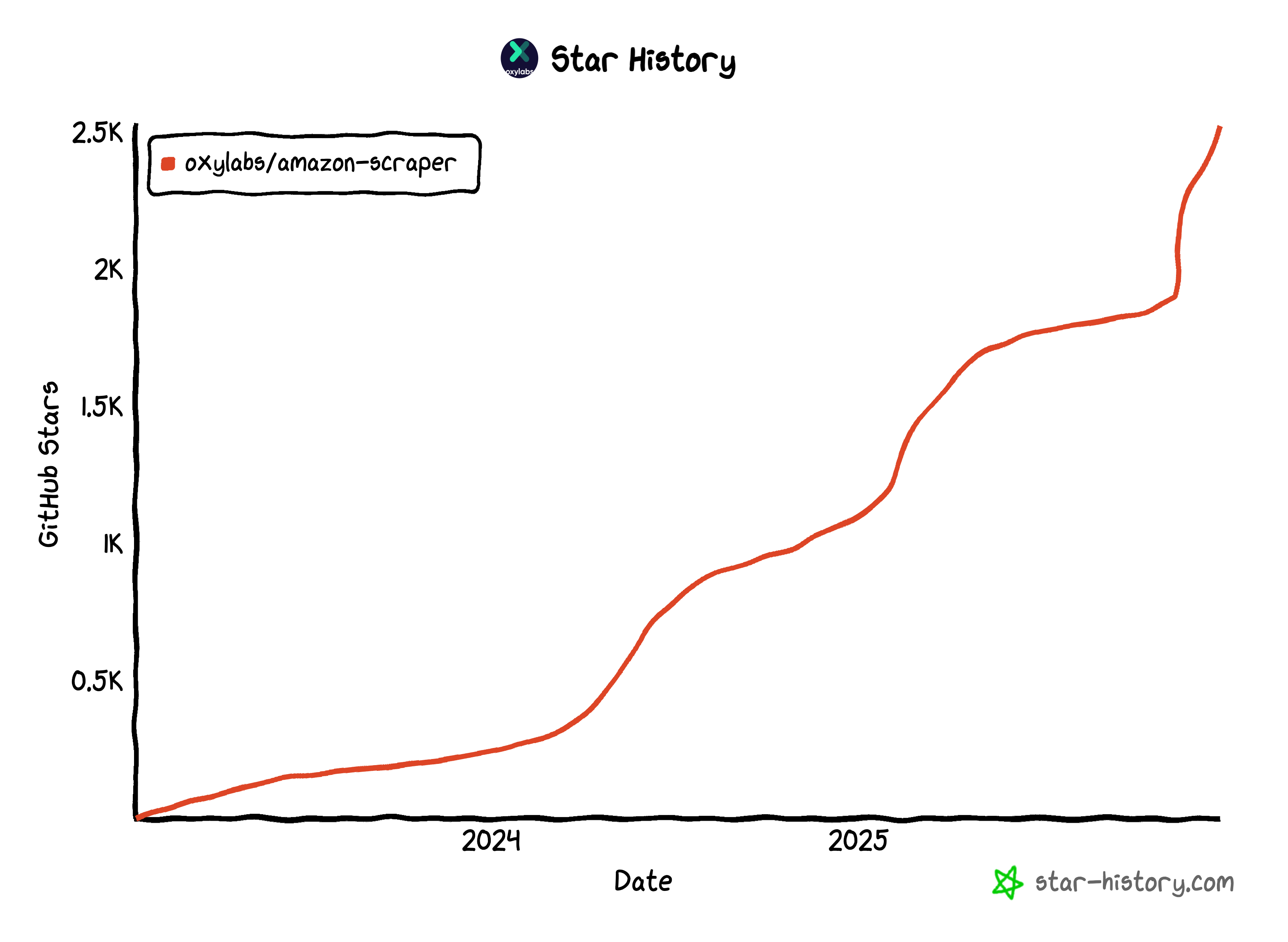
And, if you combine their entire GitHub marketing strategy, they've got over 10k stars. I actually published a case study where I show you their strengths and improvement points from multiple perspectives, like Search Engine Optimization, Developer Experience (DX), and so on.

But how do you find and choose the best topic tags?
To help with that task, we built a free GitHub repo visibility analyzer that will give you personalized recommendations on how to get more visibility and stars for your project. It made it to the frontpage of Product Hunt.
Here are some best practices I found while doing SEO for GitHub and analyzing how top performers do it:
When it comes to the amount, pick at least six tags for maximum visibility (the limit is twenty).
Add a combination of semantic tags: some for purpose (text-classification, data-visualization, automation…), some about your tech stack (sql, flask, node, tailwindcss, nextjs, vercel, aws, shopify…), and some for the field or industry (machine-learning, nlp, api, data-engineering, statistics…).
Regarding competition, avoid topic tags where nobody else is trying to rank for or where you'd need too many new stars to rank in the top. The sweetness is in the middle: popular tags where you have real chances to rank high now or in the relatively near future.
It's sometimes useful to use tags that aren't very popular yet are more specific to your niche, but don't use too many.
For the record, using your repo's primary programming language as a tag is unlikely to boost your discoverability because GitHub has an auto-filter for that.
And please, avoid irrelevant tags that don't contribute to discoverability. Examples include beta-feature, new-version, 2027, release1, draft, or app.
Plan for repository freshness
Even if your project ranks well in topic pages, developers will ignore it if it hasn't been updated in a long time.
And search engines know that because they tend to penalize old and outdated content much more than in other industries.
The bare minimum is to make some small improvements to your documentation from time to time. Or, if you're developing a new tool, it's generally better to release faster and update often than to publish the repo and then not to update it in a long while.
Make headings comply with technical SEO
Technical SEO is like a guardian that helps bots access and understand your content.
My biggest recommendation here is the hierarchy basics: Make sure you comply with HTML standards when it comes to headings:
H1 My cool project
 H2 Quickstart
 H2 Examples
 H2 FAQs
 H3 Can I integrate it with Svelte?
 H3 How to solve error XYZ?
You can use a free Chrome extension tool such as Detailed SEO to get an overview of your heading hierarchy. For example, inspect puppeteer.
GitHub is very messy with this matter, and one can't change it, so at least let's hold the bar.
Conclusion
Many devtool companies and projects use GitHub SEO to get attention, users, and customers, but this acquisition channel is still not very professionalized, so earlier adopters have the potential to get huge results.
We've generated over $8M with SEO for engineer-oriented companies, so if you want help, drop me a message on LinkedIn or schedule a strategy call.

Written by
AI SEO consultant, ChatGPT Ads expert and fractional GTM leader specializing in B2B SaaS, data, and AI startups. He has driven more than $12M across marketing, product, and sales, including over $8M through SEO, and has 8+ years of experience across content marketing, PPC, CRO, and more. He also co-founded a startup and has helped multiple companies reach successful exits.